
If you’re running into the “Character Creation Restricted” message in AION 2, you’re not alone. This issue is fairly common in the current build of the game and usually has nothing to do with your PC or installation. It’s mostly tied to server-side limits, regional locks, and account verification rules enforced by NCSoft.
The good news is that in most cases, you can fix it by adjusting your connection, account setup, or server choice. Below is a clear breakdown of what actually causes the error and how players are getting around it.
Why this error happens
Before fixing it, it helps to understand what’s going on:
- The game uses strict regional restrictions, especially for Taiwan (TW) and Korea (KR) servers
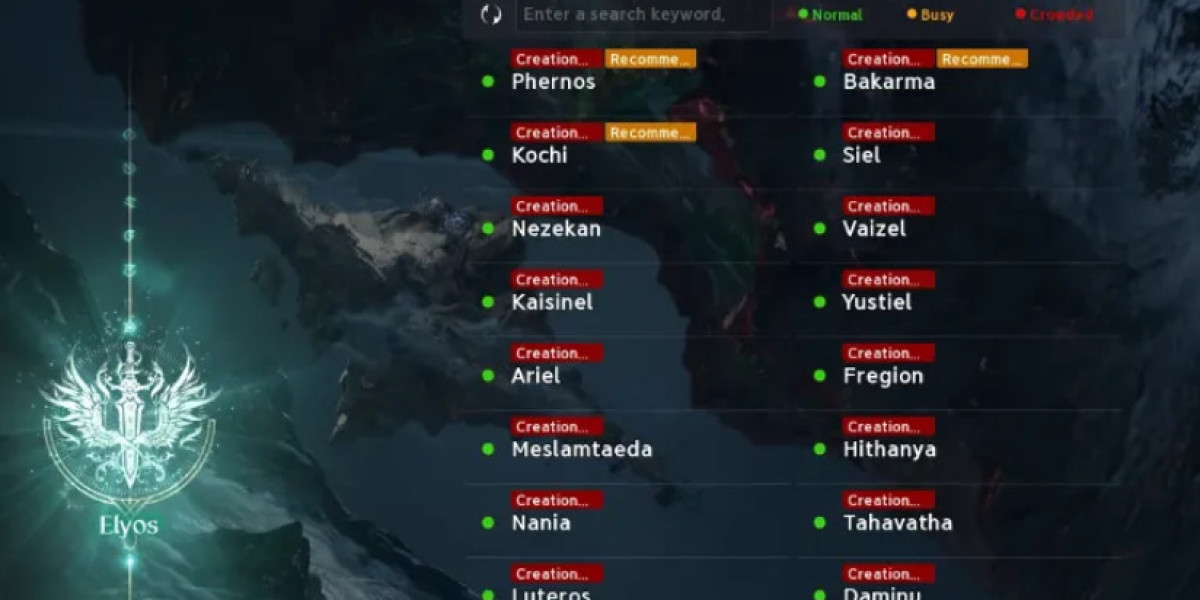
- Some servers disable character creation when they reach capacity
- NCSoft’s security system may block new characters until device verification is completed
- Network routing issues can also interrupt the final creation step
So the error isn’t random—it’s usually one of these four conditions.
Method 1: Bypass region restrictions
One of the most common causes is region locking. If your IP is outside the supported area, character creation may be blocked even if you can log in.
Steps:
- Fully close the game and the NCSoft Purple launcher
- Start a trusted VPN client
- Connect to a Taiwan or South Korea server (depending on your account region)
- If needed, create a new NCSoft account while connected to that region
- Relaunch Purple and try character creation again
This method works because it aligns your account region and IP location with the game’s server requirements.
Method 2: Complete account and device verification
NCSoft uses extra security checks to prevent bots and automated account creation. If verification is incomplete, character creation may be blocked.
Steps:
- Exit the Purple launcher completely
- Reopen it and log in again
- If prompted for Google Authenticator, choose “Other Method”
- Request an SMS code linked to your NC account
- Enter the code and complete device registration
- Relaunch the game and retry character creation
Once your device is verified, this issue often disappears immediately.
Method 3: Switch servers or wait for capacity drops
Another major reason is simple server overload. When a server hits its population cap, character creation is temporarily disabled.
What you can do:
- Check server status for “Full” or “Restricted” tags
- Choose a newer or lower-population server
- Try again during off-peak hours (late night or early morning in Taiwan/Korea time)
This is often the easiest fix if you don’t want to change network settings.
Method 4: Fix network routing issues
Sometimes the character creator loads, but fails at the final confirmation step. This usually points to network instability or poor routing to the game servers.
Steps:
- Open Command Prompt as administrator
- Run:
ipconfig /flushdns - Change DNS to Google DNS:
- 8.8.8.8
- 8.8.4.4
- Optionally use a gaming network optimizer or GPN service to reduce latency and routing issues
These adjustments help stabilize communication with NCSoft servers during character creation.
The “Character Creation Restricted” error in AION 2 is rarely permanent. In most cases, it comes down to region mismatch, server capacity, or missing verification steps rather than a broken client.
If you work through the methods above in order—starting with VPN and server selection, then moving to verification and network fixes—you should be able to get into character creation without much trouble.
Once the restrictions are cleared, the game behaves normally, and you can proceed with character setup without further blocks.